
Start each day with top priorities instead of hunting through messages and notes.
Founding Mac pilot now open
ExOrion PursuitOS Founding Pilot
Turn scattered prospect activity into clear next actions. PursuitOS helps consultants and small service businesses prioritize follow-up, analyze signals, prepare for calls, and draft better outreach without turning business development into a second full-time job.
AI-assisted
Human-approved
Local-first pilot
No automatic sending
The real problem
Your next opportunity is probably somewhere in the mess.
If you are an independent consultant, fractional executive, advisor, agency owner, recruiter, or professional-service provider, your business-development activity probably does not live in one clean place.
It is scattered across LinkedIn, email, meeting notes, calls, CSVs, old spreadsheets, warm introductions, and follow-up promises you meant to remember.
Every week, you have to decide:
- Who deserves attention today?
- What does this reply actually mean?
- Is this person a real opportunity or just noise?
- What should I say next?
- Is this prospect moving forward, stalled, or not a fit?
- How do I prepare for the next call without overthinking it?
The practical solution
A calmer way to keep your funnel moving.
ExOrion PursuitOS is an AI-assisted funnel management workspace that helps you turn scattered prospect activity into clear next actions. It does not replace your judgment. It helps you use your judgment faster and more consistently.
Rank follow-up by fit, timing, commercial signal, and next action.
Turn replies, LinkedIn activity, and meeting notes into recommended next steps.
Generate follow-up drafts you can edit, approve, and copy into your outreach channel.
Review strategy, questions, signals to listen for, and natural responses before a prospect call.
Approve or reject stage changes, drafts, recommendations, and follow-up decisions.
Actual pilot workspace
Built around a daily operating rhythm, not a heavy CRM habit.
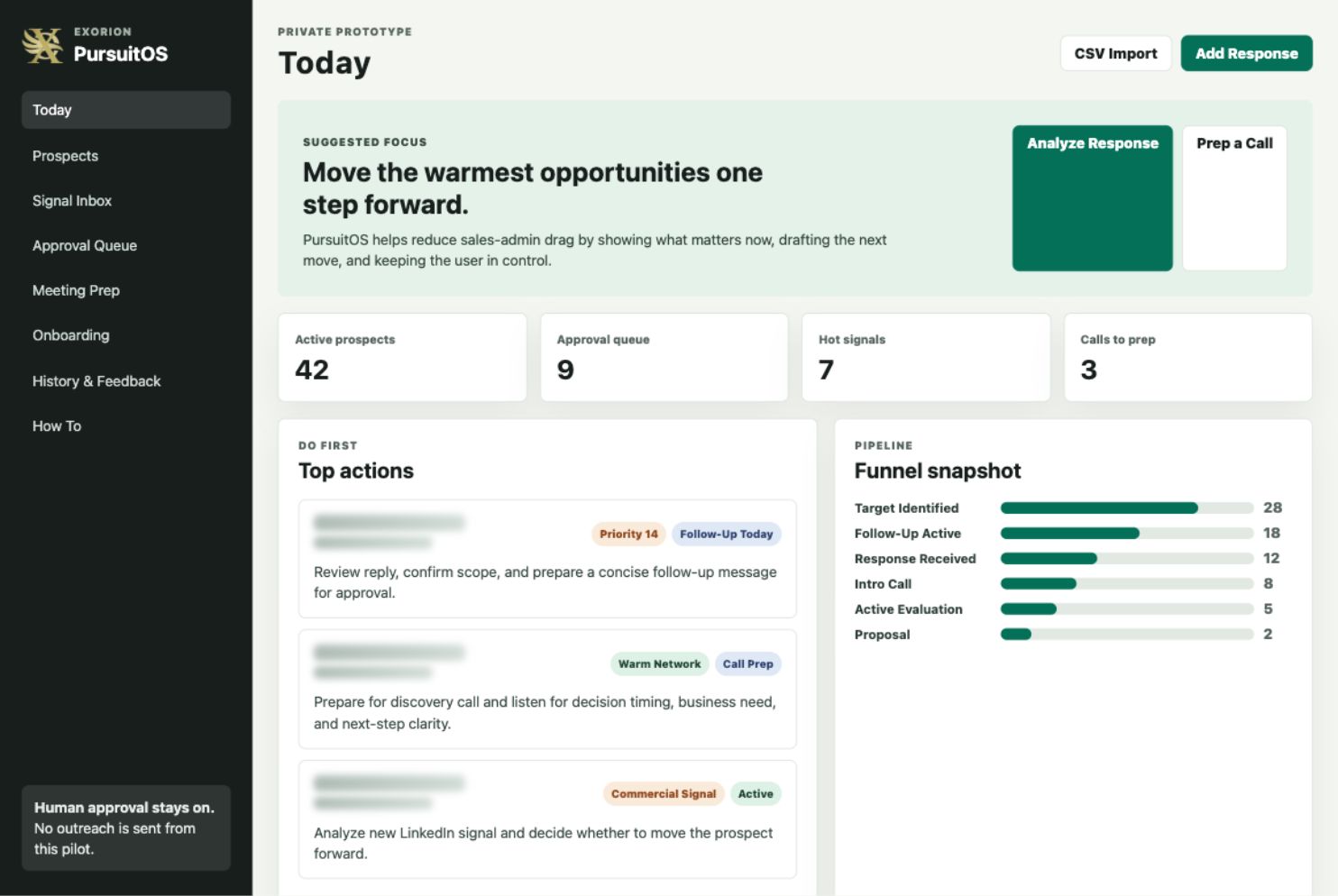
Inside PursuitOS
The workflow, in plain English.
Today
Your daily command center for top priorities, funnel snapshot, approval queue, weekly review, and key actions.
Prospects
Review individual records with stage, score, tier, contact details, notes, activity history, stage chevrons, edits, disqualification, and reintroduction.
Signal Inbox
Review reasons to act, including commercial interest, LinkedIn activity, warm-network context, fit, timing, and new information.
Add Response
Paste replies, phone notes, meeting summaries, transcripts, free-form notes, or screenshots so AI can recommend meaning, next action, fit, stage, and message angle.
Approval Queue
Review drafted follow-up messages. Edit, regenerate, approve, copy, or skip. Nothing is sent automatically.
Meeting Prep
Prepare for calls with strategy, signals to listen for, natural responses, questions, next-step guidance, and rate or pricing context where available.
Onboarding
Tell the app what you sell, who you serve, your ideal client, preferred deal type, disqualifiers, pricing or rate range, and tone.
CSV Import
Import prospects in batches using a template with duplicate detection.
History & Feedback
Track activity, exports, product feedback, stage decisions, imports, approvals, and lessons learned.
How the Mac pilot works
Local-first, early access, and guided enough to be useful.
The current pilot is delivered as a Mac download: ExOrion_PursuitOS_Mac_Pilot.zip. It runs locally on your Mac and opens in your browser.
Local support files are stored in ~/Library/Application Support/ExOrion PursuitOS. Exports are saved in the exports folder inside that same location.
- Download the zip file.
- Unzip it.
- Open
ExOrion PursuitOS.app. - If macOS blocks it, right-click the app and choose Open.
- Paste your OpenAI API key or skip that step.
- Complete onboarding.
- Import your CSV prospect list.
- Start on the Today page.
AI and data
AI support, with human approval kept in place.
During the pilot, PursuitOS uses a bring-your-own OpenAI API key model. You can paste an OpenAI API key during setup or skip it.
With an API key, PursuitOS can analyze replies, interpret LinkedIn messages and signals, summarize notes or transcripts, recommend next actions, suggest funnel stage changes, regenerate follow-up messages, and tailor outreach to your services, tone, pricing, and goals.
Important trust boundaries
- PursuitOS is not automated sending.
- PursuitOS is not a spam outreach system.
- Messages are not sent for you.
- Gmail and Outlook draft creation are not fully connected yet.
- You decide what to approve, edit, copy, send, skip, or reject.
Pilot options
Join the founding pilot.
Founding Pilot
$750
Best for independent consultants or solo professionals who want early access and can handle most setup with light guidance.
- Mac pilot app zip
- CSV import template
- Setup guide
- 30-minute onboarding call
- One follow-up review after 1-2 weeks
- Feedback channel
Guided Setup Pilot
$1,500
Best for users who want help turning their current prospect list and business-development process into a working PursuitOS setup.
- Everything in Founding Pilot
- Help cleaning and importing your first prospect list
- Ideal customer profile configuration
- Service positioning, tone, disqualifiers, and follow-up rhythm
- One live pipeline review
Optional Support
$500/mo
Best for users who want ongoing help reviewing pipeline movement, interpreting signals, improving messages, and keeping the system clean.
- Pipeline review support
- Message improvement support
- Funnel hygiene
- Follow-up prioritization
- Lessons learned for future workflow improvements
Who this is for
Built for people who sell expertise.
- Independent consultants pursuing anchor contracts.
- Fractional executives seeking retainers, advisory work, or project opportunities.
- Small agencies managing warm leads and prospect conversations.
- Coaches and advisors who need a more consistent follow-up process.
- Recruiters and business-development operators managing many signals.
- Professional-service firms that want a lighter way to manage funnel movement.
Not for
Not mass outreach. Not a finished SaaS.
- Automated LinkedIn or email sending.
- A fully managed enterprise CRM replacement.
- A polished SaaS platform with team accounts today.
- Guaranteed closed deals.
- A tool that removes the need for human judgment.
Known pilot limitations
Early access means useful, not finished.
Mac pilot package only
Not a full SaaS platform yet
Not code-signed yet
Gmail/Outlook drafts not fully connected
Bring-your-own OpenAI API key
OpenAI API billing may be required
That is why this is a founding pilot, not a broad public launch. Pilot users get early access, guided setup options, and a direct feedback channel while the product is shaped around real workflows.
FAQ
Common pilot questions.
Is this a CRM?
Not exactly. PursuitOS has CRM-like pieces, such as prospect records, stages, activity history, and follow-up tracking. But it is a lighter workflow assistant for people who need to decide who to follow up with, what a signal means, what to say next, and how to keep the funnel moving.
Does it send emails or LinkedIn messages for me?
No. PursuitOS does not send outreach automatically. It helps draft, prioritize, analyze, and prepare. You review, edit, approve, copy, send, skip, or reject.
Do I need an OpenAI API key?
You do not need one just to open the app. But you will want one for the strongest AI-assisted features, including response analysis, message regeneration, meeting-note interpretation, next-action recommendations, and stage-change suggestions.
Is my ChatGPT subscription enough?
No. A regular ChatGPT subscription is separate from OpenAI API usage. PursuitOS uses an OpenAI API key during the pilot. API usage may require billing to be set up in your OpenAI Platform account.
Where does my data live?
During the Mac pilot, the app runs locally on your Mac and opens in your browser. Local support files are stored in ~/Library/Application Support/ExOrion PursuitOS, and exports are saved in the exports folder there.
What happens if I skip the API key?
The app still opens. You can explore the workflow and use local prototype rules where available. AI-assisted quality will be more limited until you add an OpenAI API key.
Why is macOS showing a warning?
The pilot app is not code-signed yet. That means macOS may show a security warning the first time you open it. For the pilot, you may need to right-click the app and choose Open.
Who is this best for?
PursuitOS is best for independent consultants, fractional executives, advisors, agencies, recruiters, and professional-service providers who already have prospect activity but need a clearer way to manage follow-up and funnel movement.
What happens after the pilot?
After the pilot, you can decide whether ongoing pipeline support is useful. Your feedback may also help shape the future version of PursuitOS, including subscription packaging, managed AI usage, cloud storage, and integrations.
Can this work for a small team?
The current pilot is best for individuals or very small teams working from one local Mac setup. A fuller team version would require user accounts, shared cloud storage, permissions, and team workflows.
Founding pilot
Want a clearer way to manage your next opportunity?
If you already have prospects, conversations, LinkedIn activity, meeting notes, and follow-up obligations, PursuitOS can help you turn that scattered activity into a more consistent business-development rhythm.
AI-assisted. Human-approved. No automatic sending.